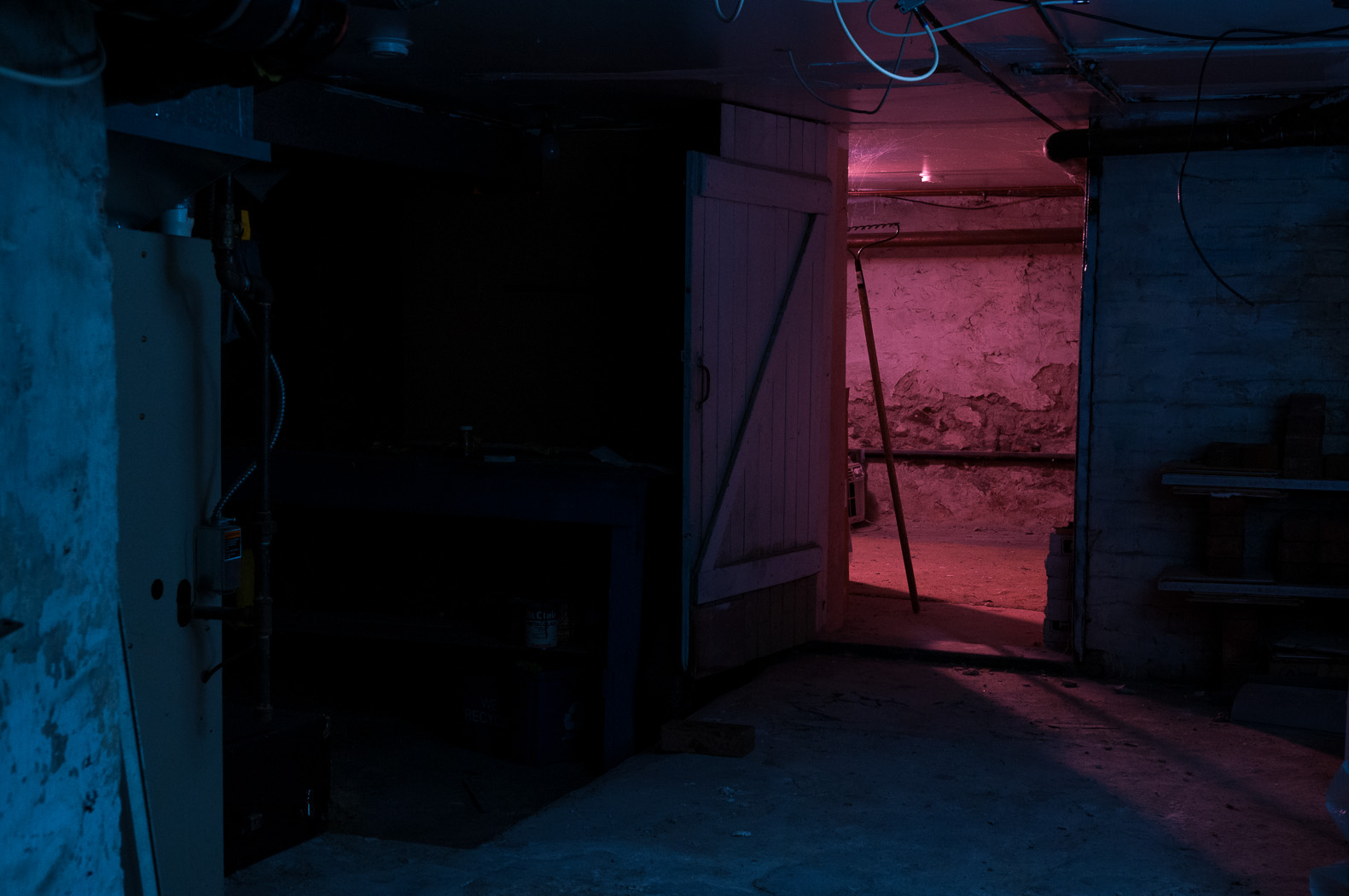
ObG Thursdays – Photographing a Jaguar E-Type in a Barn

My good friend Portt was asked to photograph a fully-restored Jaguar E-Type for an Ebay sale. Being the “guy with the lights” and also a car nut he asked me if I wanted to come along and meet the fantastically beautiful work of art, perfection on wheels. “Yes”, I said.  I was fully expecting to park the car under a tree, near a fence, with a picturesque farm scene behind. Or on a twisty road, tunneled by tall trees. But in reality it was sitting in a dark and dusty barn basement under a tarp, boxed in by a bunch of other stored cars.

We set up the lights as best we could to not create too many hot spots and blown-out specular reflections. The key was to have the light sources as large and diffuse as possible. Since I don’t own and giant car-length softboxes or strip lights, instead I brought my umbrellas and brolly-box as close to the car as I could. For lights I used my two Alien Bees B800s and a Vivitar 285HV, all remote triggered by Paul C Buff Cybersyncs. The camera was a D300s with AF-S 17-55mm f/2.8 @ 17mm f/6.3 1/60s ISO 200.5608737566_032338f1c5_o

Meet Easton Nathanael Persaud

Nat and Lauren, some of my best friends, have a new member of the family as of February 7. Easton Nathanael is an adorable baby boy and I feel so lucky to have met him when he was just 8 hours old. Lauren and Nat had Mitzy and me over on Saturday to take some photos of the new family of 4. I haven’t had a lot of experience with baby photography but I love shooting their kids. Their daughter, Harper, has become quite the photogenic toddler especially now that she’s warmed up to me. Here is one of my favourites (D7000 with AF-S 35mm f/1.8 @ f/2.8 1/200s ISO 400):DSC_9809-Edit-2To give a bit of editing history, here is the image when first imported into Lightroom.DSC_9809-2In Lightroom I did a few tweaks to prepare the shot for editing in Photoshop, namely

  • highlight reduction/shadow boost
  • reduced clarity/increased sharpness
  • vibrance reduction
  • lens correction
  • ‘Camera Portrait’ camera calibration

This is how the photo looked coming out of Lightroom:DSC_9809In Photoshop I removed some dry skin and red patches (under the nose and the lines on the shoulder). I used the color correction tool to shift some of the magenta tones in the skin towards the green and some local reduction of red saturation. I tried out a new Photoshop preset (a gift from a friend) to get the final look.

Enjoy!

ObG Thursdays – Top of the Great Wall

Today’s Oldie-but-Goodie post comes from a year ago this week when I was high up on the Great Wall of China. I was in China for work (lots of photos here) and stayed for a few days to meet up with my friends Mark and Ling in Wuqing, on the south side of Beijing. They were wonderful hosts and on the second day of my visit they hired a car to take us to the Great Wall north of Beijing. The driver got a little lost and ended up taking us to a different section of the wall than we’d intended but we didn’t complain. This mountain pass, known as Juyongguan Pass, had a great ring of wall that went up the north side (Badaling) and back down again, across the valley and then up and down the south side. The climb was steep and grueling.

I had with me the D300s, AF-S 35mm f/1.8, Tokina 11-16mm f/2.8 and a borrowed AF-S 18-135mm f/3.5-5.6 and made good use of them all. The day was extremely hazy and visibility was a lot worse than the photos make it out to seem. When editing I added a huge amount of contrast and saturation to keep them from looking washed out.

The shot below was with the 11-16mm at 11mm 1/125s f/9 ISO200. Although it doesn’t look it, I composed this as a 4-shot high dynamic range (HDR) image. Each of the images that went into it were separated by a 1EV exposure difference. I found that the HDR process brought out a richness of colour that wasn’t there in the individual shots. To add separation between the individual mountain peaks and the foreground I did some dodging and burning with the curves tool and blending duplicate layers with soft light and screen modes. I used added a bit of glow to add an ethereal feel.Great Wall of China

What’s in My Bag Part 1 – The Digital Kit

I thought it was about time that I do a little show and tell with the gear that I shoot with. I’ll start today with the Nikon digital kit. The two digital bodies I use are the D300s and D7000. Both are APS-C (Nikon calls this DX) bodies, meaning the sensors are smaller than a 35mm negative (or Full Frame sensor, which Nikon calls FX). This crop comes into play when looking at the focal length of a lens. A 50mm lens on an FX body has the field of view of a 50mm lens; however on a DX body is has the field of view of 50mm x 1.5 (=75mm). Thus a standard prime on FX is a short telephoto on DX. I’ll get back to this shortly. First, here is my digital kit:P1110569-EditThe bodies I’ve already mentioned. On the D7000 at the left is the Nikkor AF-S 35mm f/1.8 G and on the D300s at the right is the Sigma AF 50mm f/1.4 EX. The remaining lenses, from left to right, are Tokina 11-16mm f/2.8 (version I), Nikkor AF-S 17-55mm f/2.8 G, Tokina 50-135mm f/2.8, Nikkor AF-S 85mm f/1.8 G and Micro-Nikkor AF-S 60mm f/2.8 G. The flash at the left is a Metz 48 AF-1 and on the right is a Nikon SB-700. Not pictured is the Nikon SB-900 that I used to light the picture.

Let’s take a quick look at each of the lenses.

Nikkor AF-S 35mm f/1.8 G

This DX lens has a field of view (FOV) of 52.5mm (35mm * 1.5) and intended to be a “normal” prime, meaning that the FOV is close to that of the human eye. I find that a slightly wider FOV, something like 42-45mm equivalent, feels more natural to me. This lens is small, light and sharp sharp sharp. The bokeh is decent too. It’s fast and accurate enough to focus as well. There’s really no reason to not have this lens along with me at all times.

Sigma AF 50mm f/1.4 EX

For a 50mm this lens is huge. The filter thread is a massive 77mm. It also weighs quite a lot. It tends to over-expose on both of my bodies and can have inconsistent focus in low light situations. That said, I love it. The IQ on this lens is wonderful, even at f/1.4. With a FOV of 75mm it is just right for portraits.

Micro-Nikkor AF-S 60mm f/2.8 G

This Micro (as Nikon likes to call Macro) lens is a gem. It is the only lens I own with Nikon’s special Nanocoating, used to increase contrast and reduce flare. The optical quality at any aperture is just phenomenal. Not only that but the autofocus is lightning fast, presuming you are focussing on a subject with sufficient contrast. This lens focusses right down to 1:1 magnification (meaning that the size of an object is reproduced to exactly that size on the sensor/film). Unfortunately to get to this magnification the front of the lens must be only a few centimetres from the subject, making lighting somewhat difficult. Since the FOV on a DX body is 90mm I often use this lens for portraits (although the Sigma 50mm and Nikkor 85mm have taken on much of this responsibility).

Nikkor AF-S 85mm f/1.8 G

My newest lens, the 85mm f/1.8 fills the void of the fast telephoto lens (with a FOV on DX of 127.5mm). I have nothing but great things to say about this lens.

Tokina 11-16mm f/2.8

Back when I shot Pentax, this was at the top of my list for lenses I’d wished were available for that mount. When I switched to Nikon it went to the top of my list of lenses for my kit. This lens (a 16.5-24mm equivalent) is nice and sharp and keeps distortion pretty well in check. The chromatic aberrations are atrocious but can be easily removed in Lightroom.

An ultra-wide lens such as this is more of a specialty lens, being useful only when a very wide FOV is needed. I will commonly use it in weddings when I want a grand view of the church or hall or in landscapes when I want plenty of foreground but still keep the background in view.

Nikkor AF-S 17-55 f/2.8 G

This 25.5-82.5mm equivalent lens is by far the most versatile in my bag and is my go-to lens for weddings and events. It pairs perfectly with the D300s and since both are weather-sealed I can use them in outdoors in terrible weather. Other positives for this lens are incredibly fast focus and true professional build quality. While this lens is mechanically the best I own it does have some negative aspects. Contrast and flare resistance could be better. I find that at some focal lengths the sharpness is inconsistent across the frame (something I will characterize one day with the right test charts). I’m also not a fan of how the lens pairs with the D7000. The images don’t have the clarity I like. All that said, I use the 17-55mm more than any of my other lenses because of its versatility and reliability.

Tokina 50-135mm f/2.8

When I shot with Pentax gear one of my favourite lenses was the DA* 50-135mm f/2.8. Fortunately, Tokina sells a version of the lens for Nikon. The Tokina copy has all the sharpness of the Pentax, rivalling Nikon’s 70-200mm f/2.8 and f/4 zooms. Mechanically, I have no complaints and the focus is accurate and fast enough. I do wish the lens had more contrast and flare resistance but both can easily be fixed in Lightroom/Photoshop.

Now that I’ve presented my digital kit, a few trends are apparent. Notice that I don’t use any “slow” lenses, with my maximum apertures ranging from f/1.4 to f/2.8. Fast glass gives me the low light shooting ability that I need for weddings and concerts. I also have more DX lenses (35mm, all three zooms) than FX lenses (50mm, 60mm, 85mm). I’ve found that FX lenses are just too expensive for what I need. The Nikkor 24-70mm, for example, is 50% more expensive than my 17-55mm on the used market. Likewise, to buy a good 70-200mm f/2.8 I’d be looking at $1500-$2000 vs the $500-600 that the Tokina 50-135mm cost. Yes, I do lust of the exotic FX glass but for now I’m quite happy with what I have.

Any thoughts or comments?
Nik and Erin’s Arboretum Engagement

This past October I had the privilege of taking engagement photos for my friends Nik and Erin. Both Nik and Erin are wonderfully fun people who smiled and laughed their way through the entire shoot. Their good chemistry was instantly obvious… and infectious. This was probably the first time I’ve ever had to direct people to take a break from smiling and flirting once in a while for a few more serious shots.

We started the day off at the University of Guelph Arboretum, where the trees were just hanging on to the last of their fall colours.

DSC_8331-Edit

The first image here is a bokeh panorama combining 30+ shots from the D7000 + Sigma 50mm f/1.4 at f/1.4. THe next three are from the D300s + AF-S 17-55 f/2.8.DSC_8592-EditDSC_8577-EditDSC_8638-EditAnd finally with the D300s + Tokina 50-135mm f/2.8DSC_8602-EditAfter the arboretum we headed down Gordon St. to the river and Guelph’s beautiful covered pedestrian bridge. First, with the D300s + AF-S 17-55mm f/2.8: DSC_8734-EditAnd finally another bokeh panorama with the D7000 + Sigma 50mm f/1.4.
DSC_8477-EditYour thoughts?

The Making of a Scary Basement Photos – Part 2 (Editing)

I’d like to follow up my previous post with a more detailed explanation of how I pieced the composite image together and achieved the final look. Certain aspects of Photoshop, or photo editing in general, may seem like black art but in this case the process is fairly straightforward. I use two common image editing programs:

  • Adobe Photoshop Lightroom 4 (currently at v4.3)
  • Adobe Photoshop CS5

As I mentioned in the last post I started the process of taking this image with the final product in mind, simplifying the editing process considerably.

DSC_9718-Edit-5The first step, as in all my post-production, was to import the images into Lightroom. For those who don’t know, Lightroom is an extremely versatile program that provides a near-complete workflow from import, sort, edit, print, upload plus simple tools for generating slide shows, webpages and books. I do 95% of my editing in Lightroom and usually only go to Photoshop for complicated edits like cloning and healing or anything where layers are required.

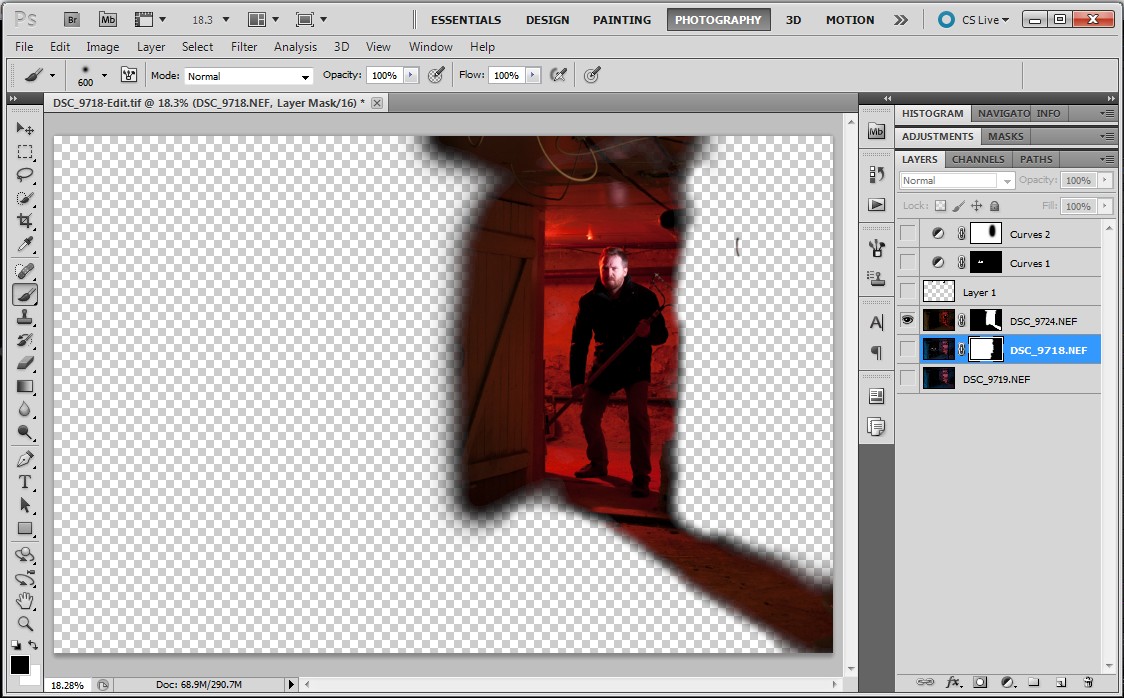
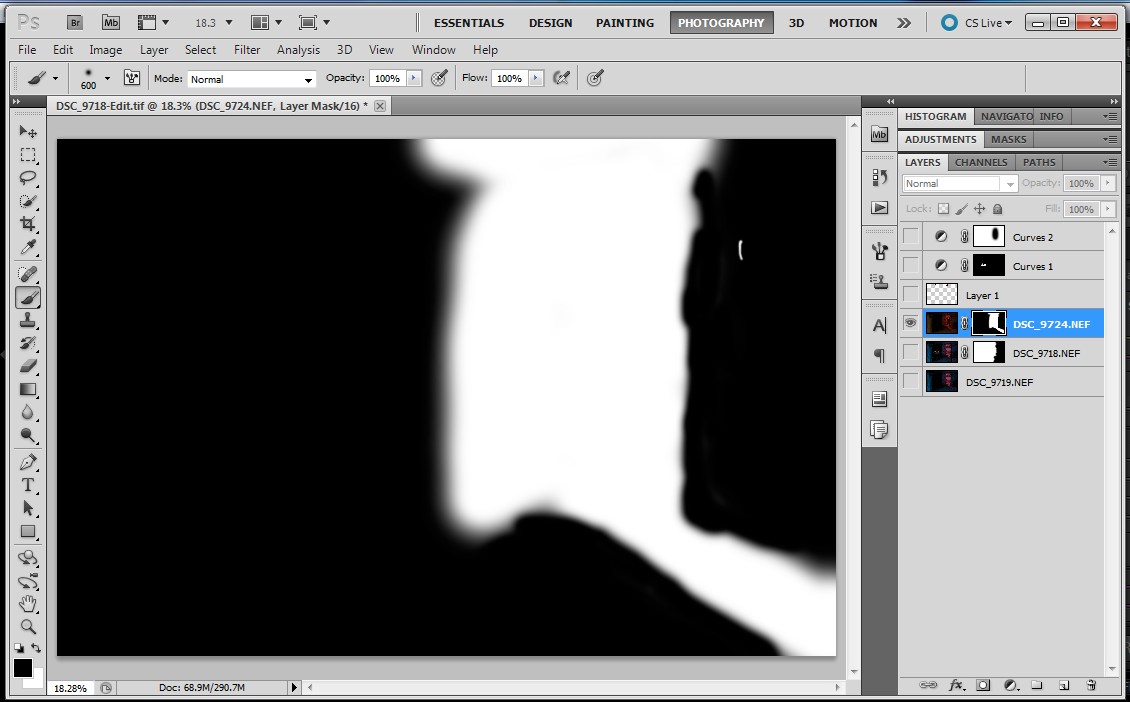
ScreenHunter_02 Jan. 11 16.42With the image of the blue room I adjusted the levels to get the brightness/contrast I wanted. I tuned the blue colour of the room with a white balance adjustment and the hue/saturation/luminance controls. I also used this control to reduce the red and orange saturation on my face.ScreenHunter_03 Jan. 11 16.44If you recall from the previous post I took a second image of the blue room with the snooted flash removed. I copied all of the adjustments from above over to this image. With the red room, I made minimal adjustments. I tweaked the white balance and increased saturation. I added some blacks to increase contrast.ScreenHunter_04 Jan. 11 16.46When finished in Lightroom I opened the three images as layers in a single Photoshop file in the following order: empty blue room > blue room with me > red room. I selected the three layers and used the Auto-Align Layers tool (in Automatic mode) to remove any misalignment from slight camera movements between shots. ScreenHunter_06 Jan. 11 16.52I masked off the right side of the “blue me” layer (to allow the underlying empty room to come through). The first image below is the resulting layer and the second image is the mask used to create it.ScreenHunter_05 Jan. 11 16.51ScreenHunter_08 Jan. 11 16.52The red room required a more complex mask to keep the red on the door and floor but not spill onto the door frame on the right side.ScreenHunter_09 Jan. 11 16.53 ScreenHunter_10 Jan. 11 16.53The three layers, when all visible, appear like this:ScreenHunter_10 Jan. 11 16.54My next step was to remove blemishes such as the smoke alarm in the blue room and some messy cables. For this I created a new layer above the three image layers. I set the healing brush and clone stamp tools to sample from all layers below. The edits appeared in the new layer, leaving the underlying layers untouched. This method makes the removal of healing/cloning edits much simpler because they can be deleted from the self-contained layer. Here is the layer containing the edits.ScreenHunter_11 Jan. 11 16.54As a final adjustment I added a curves adjustment, again as a new layer but masked off the red room.ScreenHunter_11 Jan. 11 16.55Here is the final image in Photoshop:ScreenHunter_12 Jan. 11 16.56Finally, I opened the image up in Lightroom and cropped on a slight angle to add a bit of drama.DSC_9718-Edit-5Thanks for reading!

The Making of a Scary Basement Photo

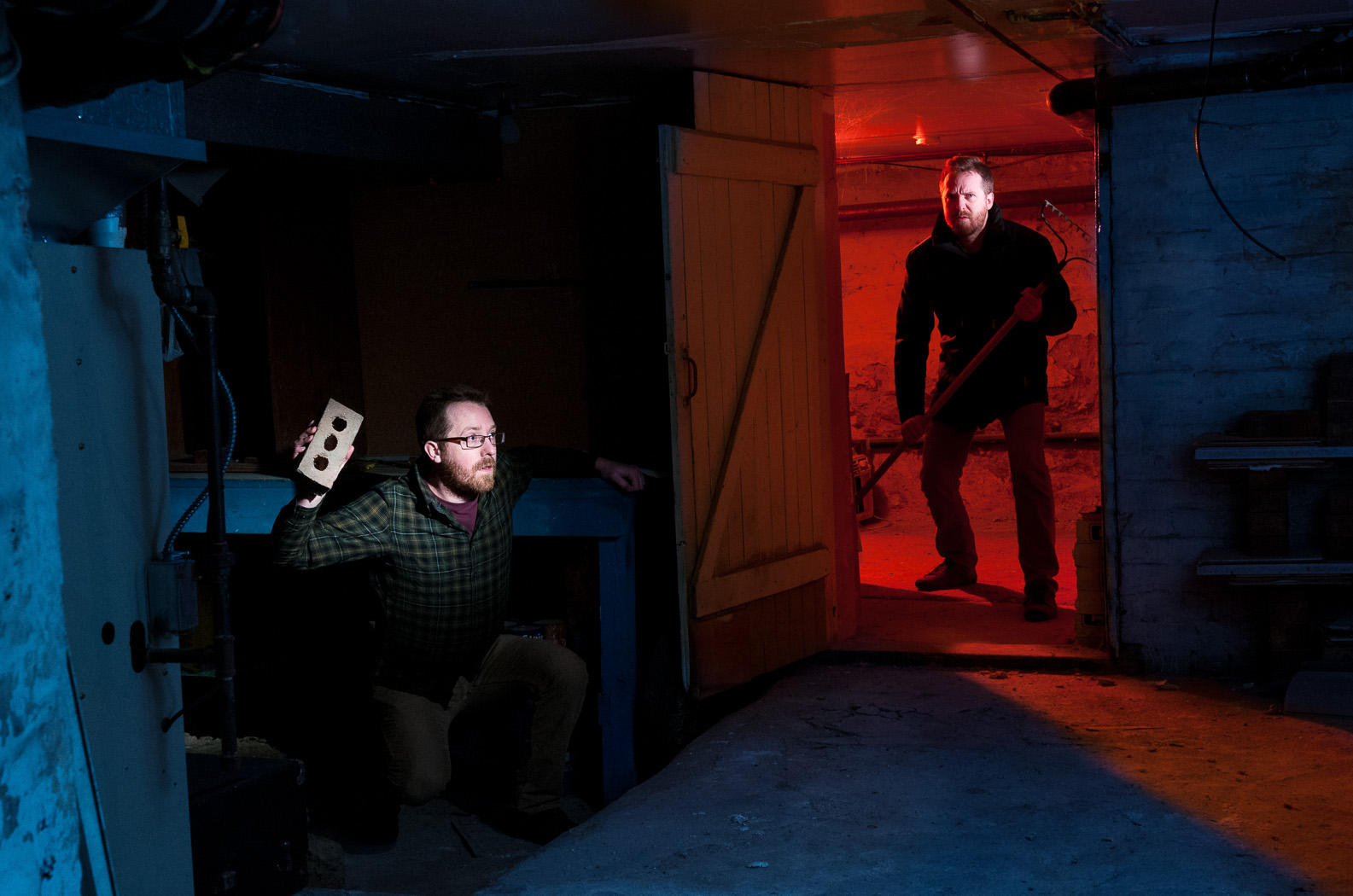
Here is my attempt at a “scary” basement photo… and double self portrait. In this post I’ll explain how I put it all together.

DSC_9718-Edit-5I’d been wanting to take a photo in my apartment’s basement for a while and was finally awarded some spare time this past week. I decided to do make the image over two nights, the first for setting up the lighting and the second for the final shots. This method gave me the time I needed to work out the lighting logistics without the stress of having to produce a result immediately. Another aspect to this image, one that is rare for me, is that I had the overall scene worked out in my head days before I actually went about doing it. I knew in advance that this would have to be a composite to include two versions of myself.

Not being someone who takes many photos with complicated lighting setups, I am limited in the equipment I have and this presented a few hurdles to overcome. Most importantly, while I own enough flashes (shoe mount and studio), I don’t have sufficient means to trigger them. I’ll get into this later.

Let’s start with the scene without any lighting. The basement is divided into three rooms and is creepy on its own.DSC_9668

To start, I put the D300s on a tripod with the AF-S 17-55mm f/2.8 set to f/8, 1/160s, ISO 400. I marked the leg locations on the floor with tape because I knew I’d have to move the tripod away from the doorway overnight.

I lit the back room in red first using a Nikon SB-700 with a red gel. I added a diffuser cap, zoomed the flash out to 14mm and set it to 1/2 power to fill the room with red. I positioned the flash behind my right shoulder to give some rim light and as a fortunate consequence it projected a nice red spill onto the floor of the main room.

To make ‘evil me’ stand out I added a Nikon SB-900 with a light purple gel. I used a grid spot to keep the light on my face and not spill onto the ceiling or door frame. I kept the power at a low level of 1/16. I positioned the head of the rake within the spill of the gridded light to separate it from the red wash.DSC_9724I took the red room image with white balance set to Flash. For the main room, I wanted to have an overall blue feel to the fill. I pointed an Alien Bees B800 studio strobe into the inside corner of the room and set the camera’s white balance to Tungsten to turn the flash’s white output blue (an alternate approach would have been adding a blue gel to the flash and since making this photo I’ve picked up some gels to fit the Alien Bees’ 7′ reflectors, including a 1/2 CT blue).

I lit ‘scared me’ with a snooted Metz 48 AF-1 at 1/8 power. I added a full CTO (orange) gel that, when combined with the Tungsten white balance on the camera, gave white light. The snoot was aimed to light just my upper body and the brick.DSC_9718In order to get the right coverage from the snooted flash I had to place it right in the middle of the frame. Another image, this time with the snooted flash removed, gave me the a clear view of that area.DSC_9719Here is the lighting diagram of the three images:

lighting-diagram-scary-basement For triggering the flashes, I had to think carefully. Three of these four flashes have optical slaves. Only two of them have connectors for wireless triggers. The Metz 48 AF-1 has neither (although since this shoot I updated the firmware to include optical slave). In the end put a wireless trigger (Cybersync) on a flash in each room and triggered the other two with their optical slaves. This made optical line of sight easy, as the two slaved flashes only had to see their nearby wirelessly triggered flashes.

I brought the three images into photoshop and masked out the unwanted areas. With some heal/clone work to remove unwanted wires and highlights and a final curves adjustment, the image was done!

Mitzy with her Foxes in the Sumac

Here’s a shot from a couple months ago during a visit to my Dad’s in Inglewood, ON. I thought it would be a good image to try out some newly discovered retouch techniques. I’m sure at some point I’ll write about them.

Taken with the D300s and Sigma 50mm f/1.4 at f/2.5.

Caledon Mist

Caledon Mist by owencherry
Caledon Mist, a photo by owencherry on Flickr.

While driving home from my Dad’s on a dreary, foggy day the sun poked through the clouds just a bit when we neared Belfountain, ON. Mitzy and I pulled off to grab a shot at my favourite lookout. On the way down the trail I stopped to take this photo, both on the Bronica and on the D300s. Since I only had the 35mm f/1.8 I had to stitch multiple shots (at least 20) into a panorama.

I’m not totally happy with how the perspective turned out, but I really like the magical feeling of the treetops and the contrast down below.

Via Flickr:
Multishot panorama near Devil’s Pulpit.